Your Fitness Journey Just Got Smarter


10,500+
50,000+
15,000+
New App Features In The Update
Training Experience & Personalisation
- All-new Workout Experience – fresh design, smarter navigation, and enhanced performance tracking.
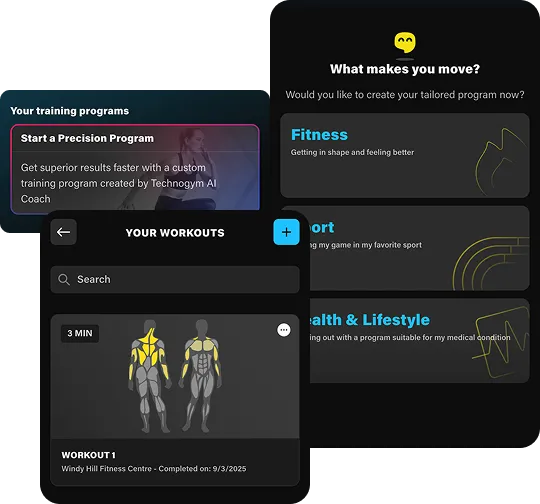
- AI-Driven Workouts – automatically tailored to your goals, preferences, and progress.
- Custom Workout Builder – create, save, and access your own routines from an expanded exercise library.
Classes, Scheduling & Notifications
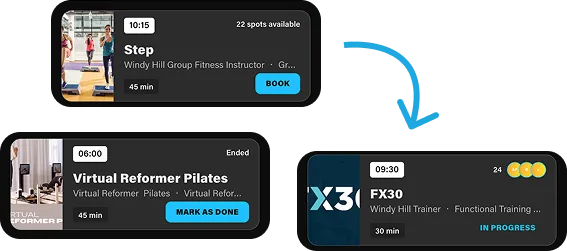
- Improved class bookings – faster, more intuitive booking flow with live visibility of waitlists and available spots.
- Push notifications – stay up to date with class reminders, club updates, and motivational nudges.
- Improved Waitlist functionality – see a live view of your position on the waitlist, and all new notifications to inform you when you have successfully moved from the waitlist into the class.
Community, Content & Member Benefits
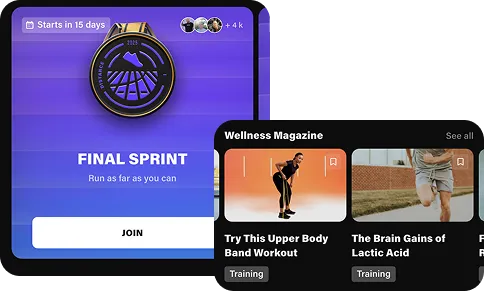
- Wellness Magazine – access exclusive articles on fitness, nutrition, recovery, and lifestyle inspiration.
- Global And Local Challenges – compete, connect, and stay motivated with the wider BlueFit community.
- Exclusive Member Rewards And Discounts – enjoy special offers and partner perks designed just for BlueFit members.
Experience the Upgrade
Get a first look at the powerful new features built to transform your training.

Start In Just Minutes

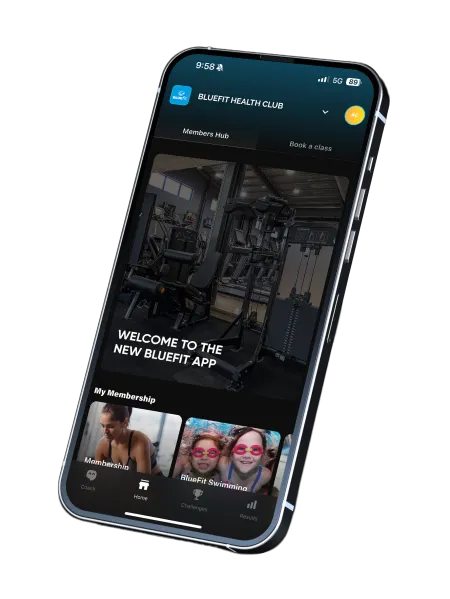
The new BlueFit Health Club App is here to level up your fitness and member experience. Enjoy a fresh new design, improved Class Bookings and Waitlists, smarter Precision Programs, a powerful workout library, Wellness Magazine, exclusive rewards, global challenges, and improved results tracking - plus easier access to news and events at your club.
The updated BlueFit app will launch from Wednesday 3rd of December.
The current app will perform an update between Monday 1st Dec - Wednesday 3rd of December. If you have automatic app updates turned on, your BlueFit Health Club app will update automatically - you can expect this to be live from Wednesday 3rd of December.
Yes - your existing login details will work on the new app - you will stay logged in through the app update process. If you do need to log in to the app again, it will be the same log in details you have used previously.
All your existing and current class bookings and workout history will transition over when the app is updated.
There is no cost for using the BlueFit Health Club app.
All your membership information will stay the same.
You are able to select ‘Book a Class’ from the coach page, or you can navigate to the ‘Home’ tab and then select the tab ‘Book a Class’. You will find all your favourite classes here available to book.
If you notice a locked icon on classes or you are not able to book a class, please speak to our Customer Service team so they can check your account. Classes are available to book for all active BlueFit Health Club members 7 days in advance, and Fitness Passport users 24 hours in advance.
Yes - all our usual cancellation policies continue to apply. You are able to manage existing bookings directly from the Coach tab of the app.
Absolutely - we have improved class booking and waitlist visibility. You will be able to see how many members are in front of you on the waitlist.
Yes - you will receive both a push notification and email when you have been successfully moved into the class from the waitlist. You will automatically be booked in if a spot opens up.
You will receive a notification and an email confirming that you have successfully been booked in to a class.
Yes - all existing bookings will be present in the updated app - you will be able to see your existing bookings both on the ‘Coach’ page and within the class booking area.
Your existing program will be available via the Coach page. All your existing workouts will be present in the new app, along with all your previous workout results.
Yes - they will be able to see your workout progress and activities as previously.
You can start your workout via the Coach page
Yes, you can add workouts or activities manually via the Results page. By selecting the ‘+’ button you are able to select from a range of activities to track.
Yes - our updated BlueFit Health Club has an all new workout player, providing all new visual guidance for exercises and workouts.
Yes - all training history will transfer over.
You can view your training and wellness progress via the results page.
You are able to connect your third party apps and devices via the Data and Connections area within your profile settings.
Yes - if you had any existing 3rd party apps or devices connected they will continue to sync automatically.
Yes - all your existing body composition and measurements will be present in the Results page. All new measurements will also be present here.
The following apps provide Lifestyle Data: Google Fit, Apple Health, Samsung Health, Fitbit, Garmin, Mywellness.
If you are having any difficulties logging in or accessing the new app, please see our friendly team at Customer Service.
Please see either our Customer Service team at the front desk or speak to your Health Club Fitness Manager.
We will continue to create tutorials and user guides on the BlueFit Health Club webpage
The old app and new app are the same application - the new app that we are launching in the updated application. Both versions of the app can run at the same time - depending on your device’s update schedule, you will be on either version of the app.
Join BlueFit Health Club Community






We Are Here To Help You Get Started
If you have any issues with login into the app please fill out the form and we will assist you in the next 24h.